


Holiday Marketing Ideas for Small Business (2026)

Holiday marketing for a small business does not have to be a giant campaign. It works best as a short run of useful messages — hours, thank-yous, gift ideas, a real offer, then a greeting — that all look like they come from the same brand.
This guide collects practical holiday marketing ideas you can use in 2026, from Thanksgiving week through New Year’s Day. You’ll get a calendar of the dates that matter, ideas organized by week, and notes on keeping every graphic and caption on-brand. Use what fits. Skip what doesn’t. Fill in your own hours, prices, and shipping dates; never publish a number you have not checked.
A Simple 2026 Holiday Marketing Calendar
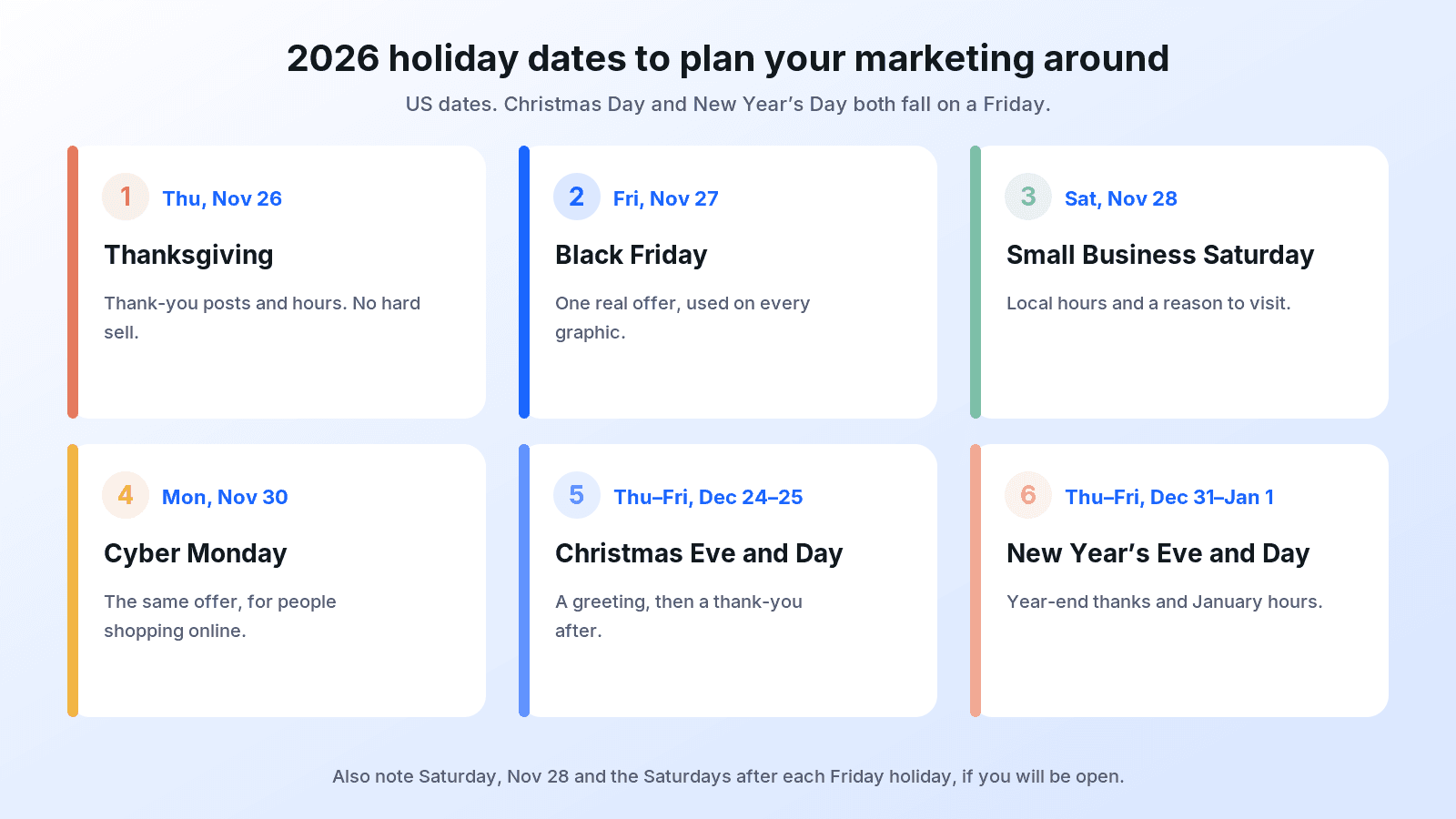
Plan backwards from the days you will be closed and the last date you can still fulfill an order. In the United States, these are the dates most small businesses need on one page this season:
- Thanksgiving: Thursday, November 26
- Black Friday: Friday, November 27
- Small Business Saturday: Saturday, November 28
- Cyber Monday: Monday, November 30
- Christmas Eve: Thursday, December 24
- Christmas Day: Friday, December 25
- New Year’s Eve: Thursday, December 31
- New Year’s Day: Friday, January 1, 2027
Christmas Day and New Year’s Day both fall on a Friday in this calendar, so the Saturdays after each holiday matter too. If you will be closed Friday and open Saturday, say so clearly.
 If you are reading this in late November, start with hours and a thank-you for Thanksgiving week. December greetings, banners, and shipping reminders can follow as soon as that weekend is planned.
Get the Foundations Right First
The holiday ideas that convert are usually the unglamorous ones: clear hours, a consistent look, and details people can trust. Set these up before you announce a sale.
1. Publish your holiday hours everywhere, in the same words
Put the hours on your door, website, Google listing, and social posts. Use the weekday, the date, and the exact time, for example “Thursday, Nov 26: Closed.” “Reduced hours over the holidays” is not information. For wording examples and the 2026 dates above, see our guide to a holiday hours sign. You can also create an on-brand holiday hours sign from your logo; the layout leaves blank lines so you can fill in your real hours before you display or post it.
2. Lock in a simple visual system
Pick the logo file, two or three brand colors, and one or two typefaces, and use them on every holiday graphic. A customer should recognize a Black Friday post and a Christmas card as the same business. A brand guideline is the place to keep those logo, color, and font rules in one document; a brand kit gathers the same building blocks for everyday use.
3. Decide how you will greet people
Some audiences expect “Merry Christmas.” Others are better served by “Happy holidays” or “Season’s greetings.” Choose one primary greeting for your public posts and cards, and stay consistent. You can still use Christmas wording in a dedicated Christmas campaign if that matches what you sell.
4. Build a gift guide from products you actually have
A gift guide is one of the most useful holiday marketing ideas for a shop or studio: three to six real products, a short note on who each one is for, and a link or a “visit us” line. Photograph what you sell. If you want a festive product image, you can upload a product photo and turn it into a holiday gift guide graphic. Check the headline and any added text before you post it yourself.
 5. Write your last-order or shipping cutoff now
If you ship or bake to order, pick the last date you can reasonably fulfill a holiday order. Put it on the gift guide, in your email, and in your bio. Repeat it as the date gets closer. Do not invent a fake “last chance” if you can still take orders tomorrow.
6. Prepare one website or email banner, not five competing ones
One wide banner with your logo, a short headline, and space for a real call to action is enough for your homepage or newsletter. Swap the headline as the calendar moves: hours this week, a sale next week, a greeting in late December. You can turn your logo into a Christmas website banner, or start with a Black Friday banner if that weekend is next on your calendar.
Thanksgiving Week Marketing Ideas (November 26–30, 2026)
This five-day stretch does a lot of work: a thank-you day, a major shopping Friday, a local Saturday, and an online Monday. You do not need a different campaign for each one. You need a thank-you, one honest offer, and a clear “we’re here” message for people who want to shop small.
7. Lead with gratitude, not a discount
On Thanksgiving Day, a simple thank-you outperforms a sale post. Name something specific: your neighborhood, a product people kept buying, or the year you have had together. For post ideas and caption examples, see Thanksgiving social media post ideas for business and Thanksgiving captions for business.
8. Share a Thanksgiving Story, then keep the offer for Friday
A vertical Story is a good place for a short greeting or a “we’re closed today / open tomorrow” sticker. Save the promo code and the product shot for Black Friday, when people are actually shopping.
9. Give Black Friday one offer and one look
Pick a single, real offer — a percentage off, a gift-with-purchase, or extended hours — and use the same headline on your post, poster, and banner. If the details change, update every version. Our Black Friday social media posts guide has campaign ideas and a Nov 20–30 plan you can adapt. For the visuals, you can upload a product photo to make a Black Friday social post, or upload your logo to make a sale poster.
10. Don’t invent urgency
If the offer runs all weekend, don’t stamp “ends tonight” on Friday’s graphic. Customers notice, and it costs trust you will need in December.
11. Make Small Business Saturday local and personal
Saturday, November 28 is when many people specifically look for independent shops. A good post is local: your street, your hours that day, and a reason to stop by. You can create a Small Business Saturday post from your logo. Small Business Saturday is a trademark of American Express. uBrand is not affiliated with, endorsed by, or sponsored by American Express.
12. Use Cyber Monday for the people who will not come in
If you sell online, Monday, November 30 is the day to put the same offer in an email and on your site. Keep the headline short. A Cyber Monday email banner made from your logo can sit at the top of that message. If you are a purely local shop with no online checkout, a simple “still here, still open, here’s how to order” email is enough. You do not have to invent an online sale.
13. Post your hours once more over the weekend
A short “open today until 6pm” post on Friday or Saturday prevents the “are you open?” comments. Use the same wording as the door sign.
14. Show the real shop or the real team
One honest photo of the counter, the workspace, or the people working that weekend will do more than a crowded stock scene. If you add a graphic around a photo, read every word on it before you publish the post yourself.
Christmas Marketing Ideas for December
After Thanksgiving weekend, ease into Christmas. Early December is for greetings and gift guides. Mid-December is for products, hours, and shipping dates. The last week is for practical reminders, then a quiet greeting on the day itself. For more post formats, see Christmas social media posts for business.
15. Open the season with a greeting
A Merry Christmas or Happy Holidays post that simply thanks people is a better first December message than another discount. You can create a Merry Christmas social post from your logo, or use a Happy Holidays post if that is the greeting you chose earlier.
 16. Refresh the website banner for December
Swap the Black Friday banner for a Christmas or “holiday hours + gift guide” banner so the first thing on your site matches the season. Keep a clear next step: shop, book, or view hours.
17. Send one thoughtful Christmas email, not a daily blast
Most small lists do better with one or two well-timed emails than with a week of nudges. A Christmas email banner from your logo gives the message a consistent header. Then write a subject line that tells the truth:
- Holiday hours and last order dates inside
- A small gift guide from [your shop name]
- We’re closing at 2pm on Thursday, Dec 24
- Thank you for a wonderful year — plus our Christmas hours
- Last day to order for Christmas delivery is [date]
Avoid all-caps urgency and vague “big news” lines. If you mention a date or a discount, it has to be correct in the body too.
18. Put a Christmas flyer where people already stand
A counter flyer, a window sheet, or a one-page event notice still works for cafés, boutiques, and local services. Keep it to one offer, hours, and how to buy. You can create an on-brand Christmas flyer from your logo, then add your real details before you display it.
19. Send business Christmas cards on purpose, not at the last minute
A short, specific card to clients, regulars, or your team is still one of the warmest holiday marketing ideas you can use. For wording, see business Christmas card messages for clients, customers, and employees. You can design a branded Christmas card from your logo. If you prefer inclusive wording, a Happy Holidays card works the same way.
20. Add a branded gift tag or gift certificate for last-minute buyers
People who cannot choose a product still want to give something. A gift certificate with blank fields for the recipient and amount, or a simple gift tag on pickup orders, keeps those sales in your shop and on your brand.
21. Show packing, wrapping, or making — not just the finished product
A photo of an order being wrapped, a tray coming out of the oven, or a package labeled for pickup is useful content. It also reminds people that a real team is doing the work.
22. Repeat the shipping cutoff as a service, not a stunt
In the second and third weeks of December, say the date again. “Order by Wednesday, Dec 16 for Christmas delivery” is enough. If you miss the cutoff, say what you can still do: local pickup, digital gift certificates, or January shipping.
23. Use Stories and captions to carry the details
A vertical Christmas Story is a good home for hours, a sticker link, or a quick behind-the-scenes clip. For caption lines you can adapt, see Christmas Instagram captions for business.
24. On Christmas Eve and Christmas Day, be present — then thank people after
A short greeting on December 24 or 25 does not need an offer. On December 26, a thank-you, leftover gift ideas, or a “we’re open today” post is plenty. Boxing Day promotions only belong here if you actually have one.
New Year Marketing Ideas
The week between Christmas and New Year’s Day is quieter, which makes it a good time to thank people and set up January. You do not need a fireworks-themed campaign.
25. Thank customers for the year you actually had
Mention a real highlight: a product you launched, a year in the neighborhood, or the support you received. A generic “best year ever” line is easy to skip.
26. Post a simple Happy New Year greeting
On December 31 or January 1, a clean greeting is enough. You can create a Happy New Year social post from your logo, and use a Happy New Year banner on your site if you want the homepage to match.
27. Share one honest note about what’s ahead
A short “here’s what we’re working on in January” post — a restock, a new workshop date, or regular hours returning — is more useful than a list of resolutions you may not keep.
28. Run a New Year sale only if the offer is real
If you have leftover inventory or a genuine January offer, say so clearly and put an end date on it. You can make a New Year sale poster from your logo. If you do not have a sale, don’t invent one just to fill the calendar.
29. Repeat hours for New Year’s Eve and New Year’s Day
Because January 1, 2027 falls on a Friday, tell people whether you are open on Saturday, January 2. Use the same wording as your door sign and website.
30. Welcome people back in the first week of January
A simple “regular hours resume Monday, January 4” or “we’re here and glad to see you” post closes the season and starts the year without another promotion.
A Week-by-Week Plan You Can Follow
Use this as a checklist, not a rigid schedule. If you only do one thing in a given week, do the item in bold.
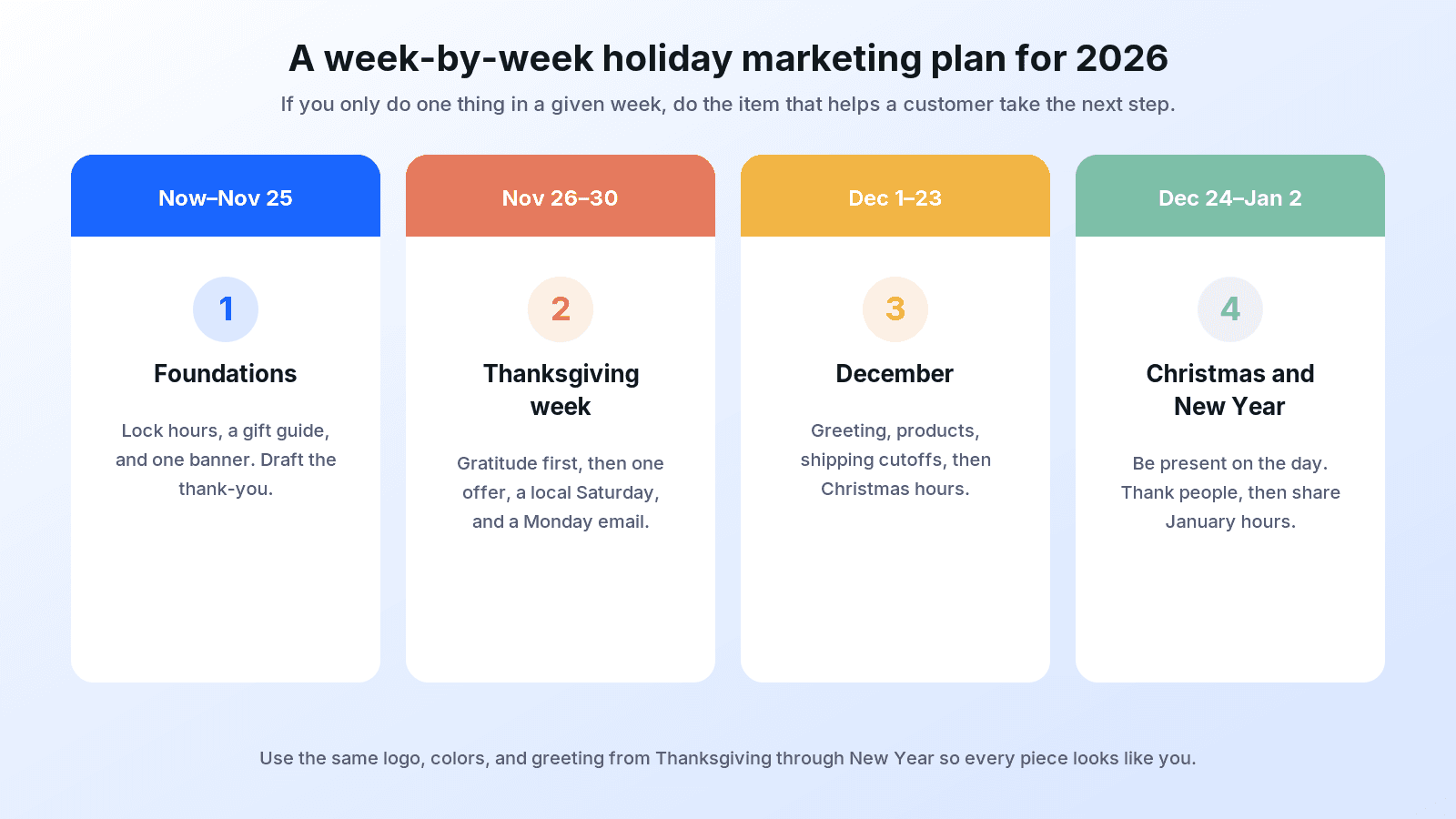 Now through Wednesday, Nov 25: Finalize hours, the gift guide, and one banner. Draft the Thanksgiving thank-you.
- Thu Nov 26–Mon Nov 30: Thank-you on Thanksgiving; one Black Friday offer; a local Small Business Saturday post; a Cyber Monday email if you sell online.
- Tue Dec 1–Mon Dec 7: Season greeting, gift guide, and a December website banner. No need for a new discount yet.
- Tue Dec 8–Tue Dec 15: Product posts, first shipping-cutoff reminder, and mid-month hours if they change.
- Wed Dec 16–Wed Dec 23: Last-order reminders, team or wrapping photos, and Christmas hours.
- Thu Dec 24–Sat Dec 26: A greeting, then a thank-you or “we’re open” note after Christmas Day.
- Sun Dec 27–Fri Jan 1: Year-end thank-you, New Year greeting, and hours for Dec 31 and Jan 1.
- Sat Jan 2 onward: Welcome-back post and regular hours. Add a January offer only if you have one.
Keep Every Holiday Piece On-Brand
The through-line in all of these holiday marketing ideas is consistency. Use the same logo file, the same colors, and the same greeting from Thanksgiving through New Year. When a template or a generated graphic adds a headline, a date, or a discount, replace the placeholders with your real information and read every word before you publish it yourself.
A written brand guideline helps anyone on your team make a last-minute Story or flyer without drifting off-brand. You do not need a large campaign to have a season that looks considered. You need a calendar, a few honest messages, and visuals that clearly belong to you.