


Holiday Hours Sign: 40+ Wording Examples, 2026 Dates & Design Tips
A holiday hours sign is a small thing that saves a lot of frustration. When a regular customer drives over on December 26 and finds your door locked with no notice, they don’t just lose a trip; they remember it. A clear sign on the door, plus the same information online, tells people exactly when you’re open, when you’re closed, and when things go back to normal.
This guide covers what to put on a holiday hours sign, the 2026 dates most US businesses plan around, more than 40 wording examples you can copy for Christmas, New Year, Thanksgiving and the whole season, and simple design tips so your sign looks like it belongs to your brand.
What to Include on a Holiday Hours Sign
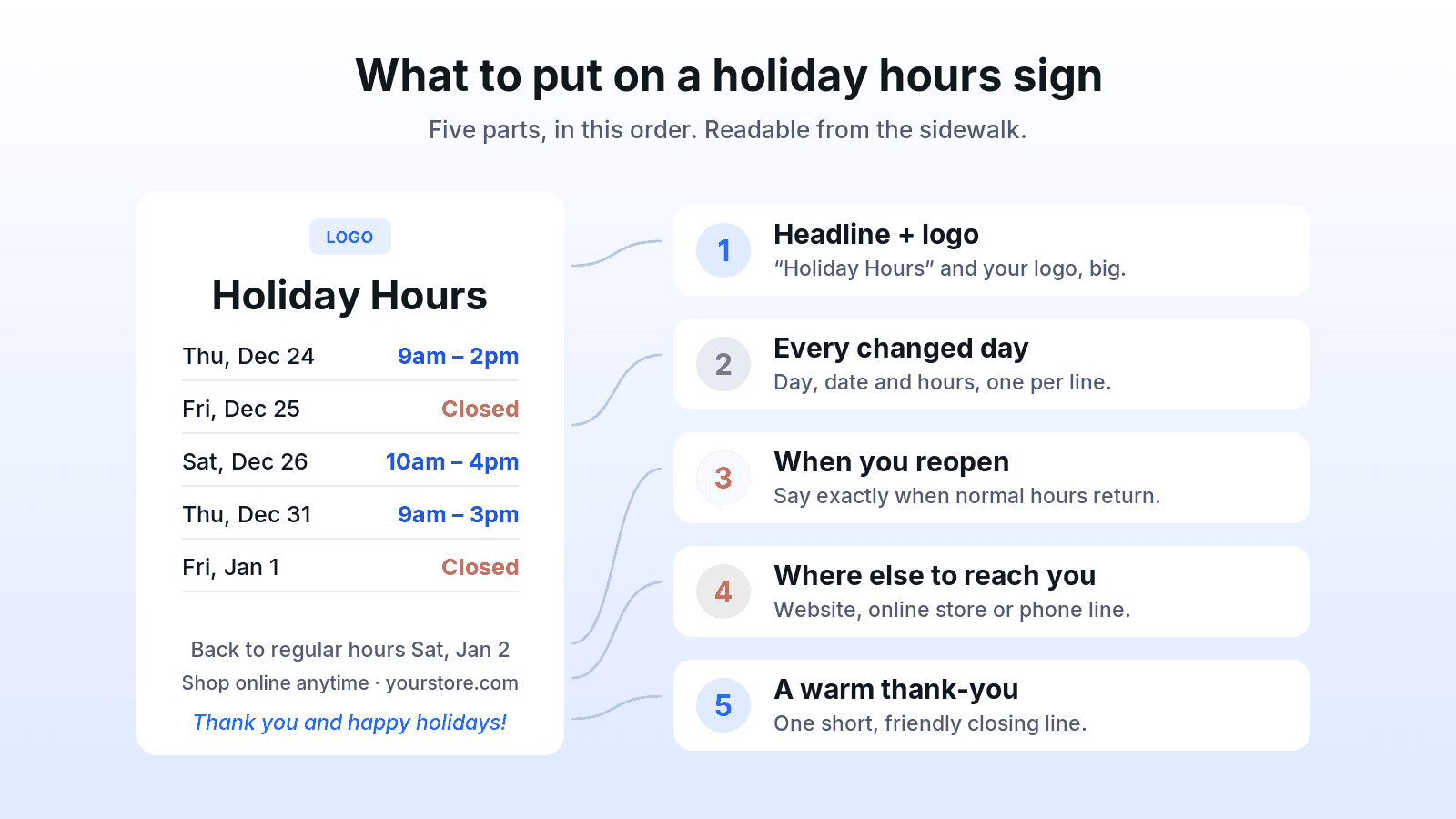
The best holiday hours signs are boring in the right way: easy to scan in three seconds from the sidewalk. Include these five parts, in this order.
- A clear headline and your logo. “Holiday Hours” is enough. Your logo tells people the sign is official, not a leftover note from last year.
- Every day that’s different. List each changed day with the weekday, date and hours on one line, for example “Thu, Dec 24: 9am – 2pm.” Write “Closed” for days you’re closed. Don’t make people guess from a date range.
- When regular hours return. “Back to regular hours Saturday, January 2” answers the question people will otherwise call to ask.
- Where else to reach you. Your website, online store, booking page or an emergency phone line, if you have one.
- A short thank-you. One warm line such as “Thank you for a wonderful year. Happy holidays!” turns a notice into a small brand moment.
 Mistakes to avoid
- Missing weekdays. “Dec 24” alone makes people count on their fingers. “Thursday, Dec 24” doesn’t.
- Vague phrases. “Reduced hours over the holidays” is not information. Give the actual times.
- Tiny text. If the hours aren’t readable from a few steps away, people will try the door anyway.
- Different hours in different places. Your door sign, website, social posts and Google listing should all say the same thing.
- Leaving it up too long. Take the sign down when regular hours return so it doesn’t confuse January customers.
2026 Holiday Dates to Plan Around
Before you write the sign, decide your hours for each of these dates. In 2026, Christmas Day (December 25) and New Year’s Day (January 1, 2027) both fall on a Friday, which creates two long weekends in a row, so be specific about the Saturdays after each holiday too.
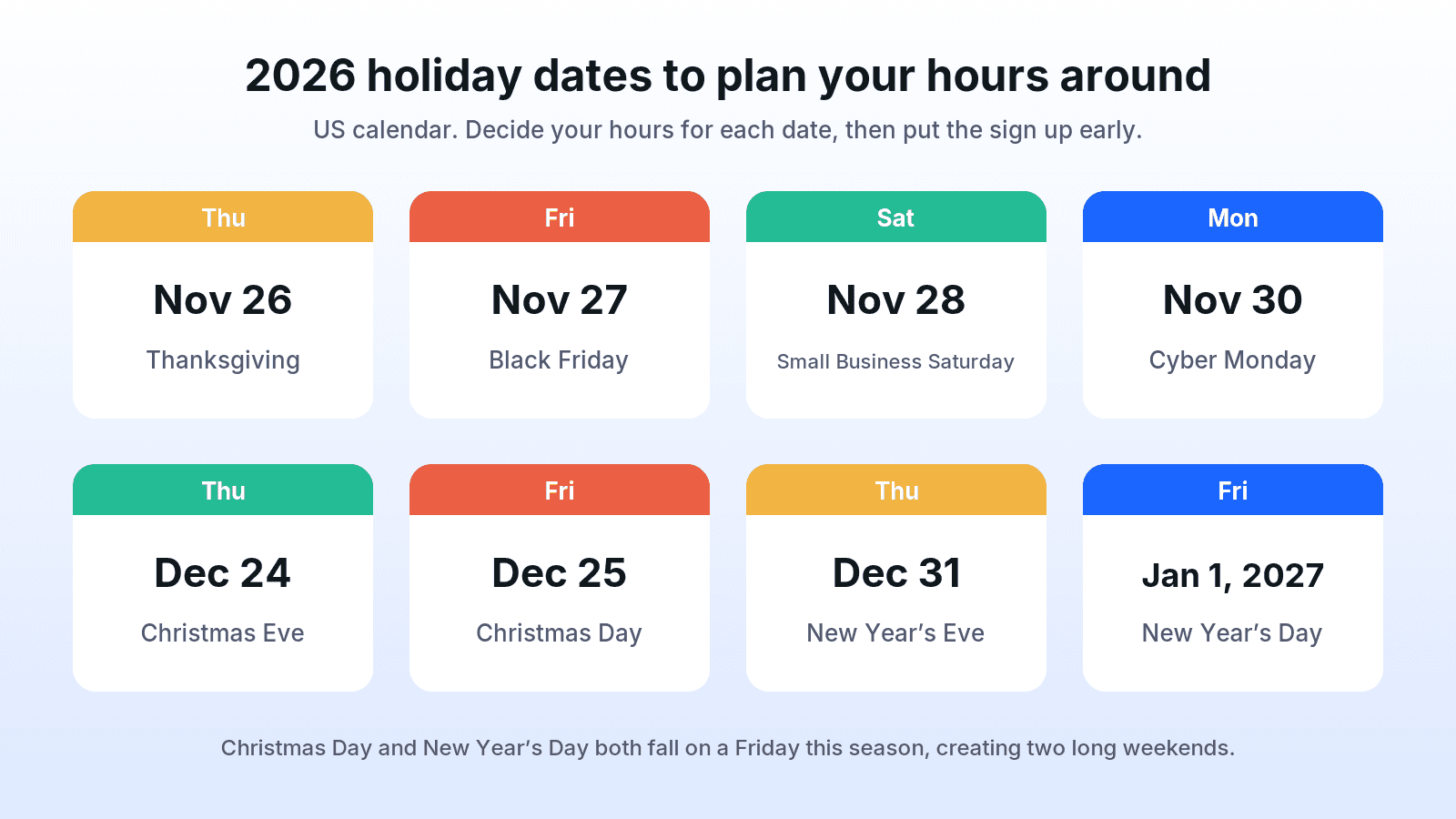 Thanksgiving: Thursday, November 26
- Black Friday: Friday, November 27
- Small Business Saturday: Saturday, November 28
- Cyber Monday: Monday, November 30
- Christmas Eve: Thursday, December 24
- Christmas Day: Friday, December 25
- New Year’s Eve: Thursday, December 31
- New Year’s Day: Friday, January 1, 2027
If your business is in a mall, shopping center or office building, check the property’s holiday schedule first. Your hours may need to follow theirs.
Holiday Hours Sign Wording Examples
Copy any of these and replace the dates, times and details with your own. Keep the format consistent across your sign, website and social posts.
Christmas Hours Signs
- Holiday Hours: Thursday, Dec 24: 9am – 2pm. Friday, Dec 25: Closed. Saturday, Dec 26: 10am – 4pm. Thank you and Merry Christmas!
- We’re closed on Christmas Day, Friday, December 25, so our team can celebrate with their families. We reopen Saturday, December 26 at 10am.
- Christmas Eve: closing early at 3pm. Christmas Day: closed. Back to regular hours Saturday, December 26.
- Merry Christmas from all of us! Our Christmas hours: Dec 24, 8am – 1pm. Dec 25, closed. Dec 26, 9am – 5pm.
- Closed Thursday, Dec 24 and Friday, Dec 25. We’ll see you Saturday, December 26. Thank you for shopping small this season!
- Last-minute gifts? We’re open until 2pm on Christmas Eve. Closed Christmas Day. Happy holidays!
New Year Hours Signs
- New Year’s Hours: Thursday, Dec 31: 9am – 3pm. Friday, Jan 1: Closed. Saturday, Jan 2: regular hours. Happy New Year!
- We’re closing early on New Year’s Eve (Dec 31) at 4pm and will be closed on New Year’s Day. See you on Saturday, January 2!
- Closed Friday, January 1, 2027. Thank you for an amazing year. We can’t wait to see you in the new one.
- Ringing in the new year! Dec 31: open 10am – 2pm. Jan 1: closed. Regular hours resume Saturday, Jan 2.
- Happy New Year from our team! We’ll be closed on January 1 and back with regular hours on January 2.
Thanksgiving Hours Signs
- Thanksgiving Hours: Wednesday, Nov 25: open until 3pm. Thursday, Nov 26: Closed. Friday, Nov 27: 8am – 8pm. Happy Thanksgiving!
- We’re closed on Thanksgiving Day so our team can be with family. Join us Friday, November 27 for Black Friday from 8am.
- Grateful for you! Closed Thursday, Nov 26. Open Black Friday and Small Business Saturday, 9am – 6pm.
- Thanksgiving week hours: Mon–Wed regular hours. Thu, Nov 26: Closed. Fri–Sat, Nov 27–28: 9am – 7pm.
Full-Season Holiday Hours Signs
- Holiday Hours: Dec 24: 9am – 2pm · Dec 25: Closed · Dec 26: 10am – 4pm · Dec 31: 9am – 3pm · Jan 1: Closed. Regular hours resume Jan 2. Thank you and happy holidays!
- Our holiday schedule: closing at 2pm on Christmas Eve and New Year’s Eve, closed on Christmas Day and New Year’s Day, regular hours all other days.
- Extended holiday shopping hours! December 14–23: open until 8pm every day. Christmas Eve: 9am – 3pm. Christmas Day: closed.
- Season’s greetings! Please note our holiday hours below and plan your visit. We appreciate you more than we can say.
Closed for the Holidays Signs
- Closed for the Holidays: Thursday, December 24 through Friday, January 1. We reopen Saturday, January 2 at 9am. Happy holidays!
- We’re taking a short winter break to rest and recharge. Closed Dec 24 – Jan 1. Online orders placed during this time will ship when we return on January 4.
- Our office is closed from December 24 to January 1. For urgent matters, email us and we’ll respond as soon as we’re back on January 4.
- Gone for the holidays! Thank you for a wonderful year. See you on Saturday, January 2.
Restaurants, Cafés and Bakeries
- Holiday Hours: Christmas Eve: 7am – 1pm (pre-ordered pies ready for pickup by noon). Christmas Day: Closed. Dec 26: back to normal hours.
- Our kitchen is closed on Christmas Day and New Year’s Day. We’re open regular hours every other day this season.
- New Year’s Eve: last seating at 8pm. New Year’s Day: closed. Happy New Year from our kitchen to your table!
- Holiday hours for coffee lovers: Dec 24, 6am – noon. Dec 25, closed. Dec 31, 6am – 2pm. Jan 1, closed.
Offices, Clinics and Service Businesses
- Our office will be closed Thursday, Dec 24 and Friday, Dec 25, and Thursday, Dec 31 and Friday, Jan 1. Regular hours resume Monday, January 4.
- Holiday closure: our office is closed on December 25 and January 1. For appointments, please book online anytime.
- Happy holidays from our team! We’ll be closed December 24 – January 1. Calls and emails will be returned starting January 4.
- Our salon is closed Christmas Day and New Year’s Day. Book your holiday appointment early; December fills up fast.
Online Stores and Customer Support
- Holiday support hours: our team is offline December 25 and January 1. Orders placed on these days will ship the next business day.
- Order by [your last order date] for delivery before Christmas. Our customer support team is available Monday to Friday, except December 25 and January 1.
- Our warehouse is closed December 24 – 27. Orders placed during this time will be processed on Monday, December 28.
Inclusive “Happy Holidays” Versions
- Happy holidays! Here’s when you can find us this season.
- Season’s greetings from our team. Please note our special hours for the holiday season.
- Wishing you a warm and restful holiday season. Our holiday hours are listed below.
- Thank you for being part of our year. Here are our hours for the holidays.
Short Versions for Social Posts and Stories
- Holiday hours are here! Save this post so you don’t miss us.
- Heads up: we’re closed Christmas Day and New Year’s Day. All other days, business as usual.
- Christmas Eve, we close at 2pm. Plan your last-minute shopping accordingly!
- Closed Dec 25 & Jan 1. Open every other day. Happy holidays, neighbors!
- Our holiday hours, all in one place. Swipe for the full schedule.
How to Design a Holiday Hours Sign That Looks On-Brand
Your sign is often the last thing customers see before a holiday visit, so treat it like any other piece of brand material.
- Use your real logo and brand colors. A sign in your own colors looks official and trustworthy. A generic clip-art template looks temporary.
- Keep festive elements as accents. A little pine, a few lights or snowflakes in the corners are enough. The hours are the main event.
- Prioritize contrast. Dark text on a light background is the easiest to read through glass and in low light.
- Use a simple layout. Dates on the left, hours on the right, one day per line. Leave plenty of white space.
- Pick a practical size. A standard letter or A4 sheet works for most doors; use a larger poster for big windows.
- Make a matching version for online. Use the same design for a social post, an Instagram Story and your website banner so customers recognize it everywhere.
If you don’t have a brand guide yet, a simple brand guideline that records your logo versions, colors and fonts makes small pieces like this much faster to create, and keeps them consistent with the rest of your brand identity kit. Our guide to brand consistency explains why it matters even for something as small as a door sign.
Make a Branded Holiday Hours Sign with uBrand
If you’d rather not start from a blank page, try the Holiday Hours Sign generator on uBrand. Upload your logo and AI creates a clean holiday hours sign for your store window, front door or social media, using your brand colors with festive touches and blank lines so you can fill in your own hours.
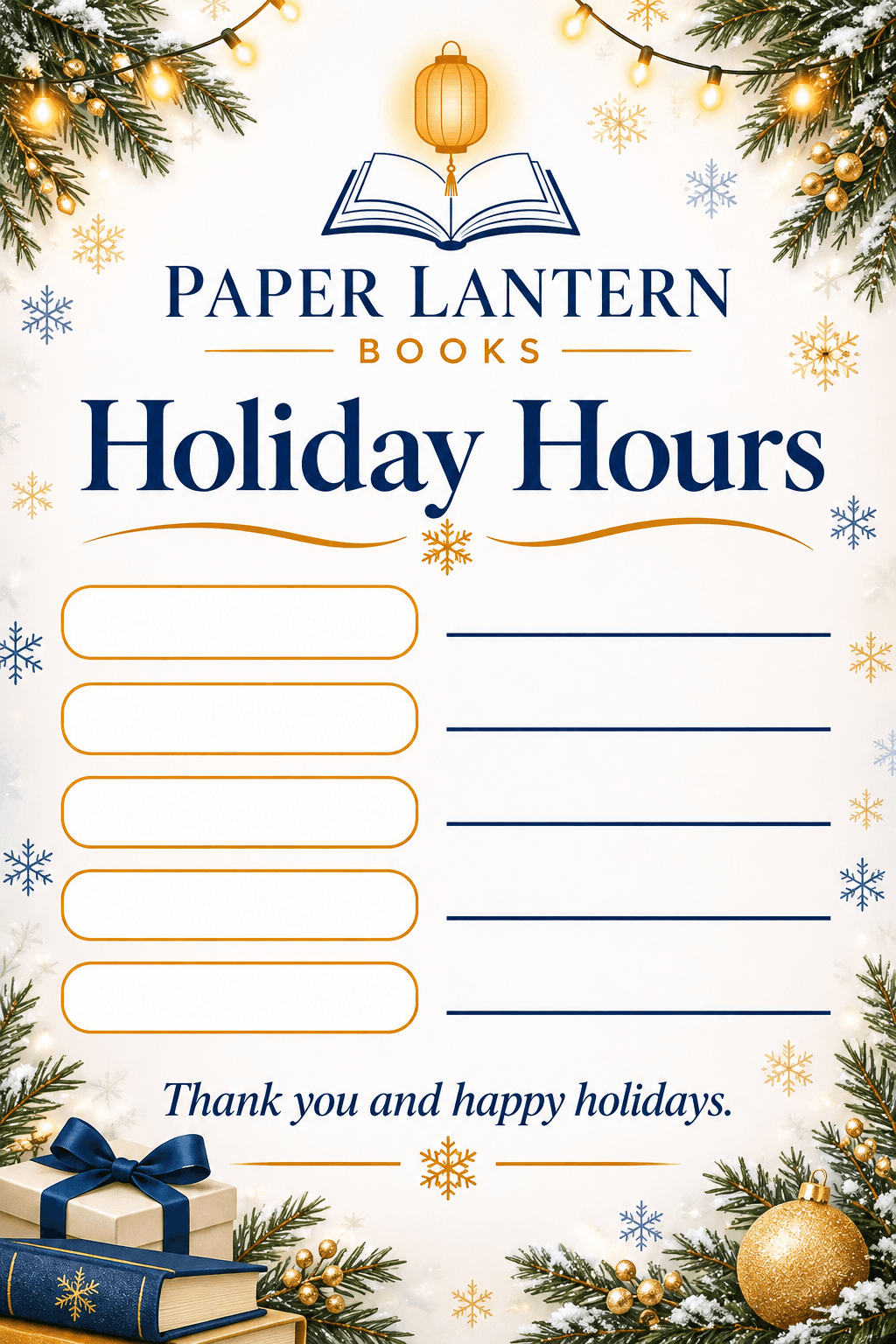 Sample generated on the template page using a fictional bookstore logo, not a real customer.
As with any AI-generated design, review the result before you use it: check that the logo looks right and that every word on the sign is correct.
For announcing your hours online, these inspiration templates create matching holiday designs from your logo:
- Christmas Instagram Story generator for a full-screen Story with space for stickers and links
- Christmas email banner generator for the header of your holiday-hours email or website banner
- Happy New Year post generator for a celebratory post when you announce your January reopening
Planning the rest of your holiday content? See our Christmas social media post ideas and business Christmas card messages.
Where to Post Your Holiday Hours
The door sign is only one place customers look. Update all of these with the same hours:
- Front door and windows, at eye level, facing out.
- Your Google Business Profile, using its special hours setting, since many people check search or maps before they leave home.
- Your website: a banner on the home page and the contact page.
- Social media: a post, a Story, and a pinned post if your platform supports it.
- Email or SMS to your customer list, ideally a week or two before the first changed day.
- Other listings such as Apple Maps, Yelp, delivery apps and booking tools.
- Phone: update your voicemail greeting with the holiday schedule.
- Checkout counter: a small table sign or receipt note in the weeks before.
Holiday Hours Sign FAQ
What should a holiday hours sign say?
A headline such as “Holiday Hours,” each changed day with its weekday, date and hours (or “Closed”), when regular hours return, where else customers can reach you, and a short thank-you. Your logo should be on it so it looks official.
When should I put up my holiday hours sign?
About one to two weeks before the first changed day is a good rule of thumb. That gives regular customers several visits to notice it. For Christmas and New Year 2026, early-to-mid December works well; for Thanksgiving, the week before.
Should I say “Merry Christmas” or “Happy Holidays”?
Either is fine. Use whatever matches your brand voice and your customers. If you serve a broad audience and aren’t sure, “Happy holidays” or “Season’s greetings” includes everyone.
How do I write that we’re closed for the holidays?
State the exact closure dates, the reopening date and time, and what customers can do in the meantime: “Closed Thursday, December 24 through Friday, January 1. We reopen Saturday, January 2 at 9am. Shop online anytime.”
Do I need to update my hours on Google?
It’s strongly recommended. Many customers check your hours on search or maps instead of visiting your website. Update the special hours for each changed date so they match your door sign.
Can I use the same design for my sign and social media?
Yes, and you should. Using the same layout, colors and wording on your door sign, social posts and website makes the schedule easy to recognize and reinforces your brand.
Final Checklist
- Decide your hours for every changed date and confirm them with your team.
- Write each day with weekday, date and hours, plus your reopening date.
- Design the sign with your logo and brand colors, keeping festive touches small.
- Proofread every date and time, then post the sign one to two weeks early.
- Update Google, your website, social media, email and voicemail with the same hours.
- Take the sign down when regular hours return.
A clear, on-brand holiday hours sign is a small detail, but it shows customers that you respect their time. That kind of care is what keeps them coming back in the new year.