


25 Thanksgiving Social Media Post Ideas for Business (With Examples)
Thanksgiving is one of the few holidays where the most effective social media post is also the simplest: a sincere thank-you. The hard part is everything around it. You need a Happy Thanksgiving post, holiday hours, a Black Friday launch, a Small Business Saturday invite, and a Cyber Monday last call, all in the same week, without your feed turning into one long sales pitch.
This guide gives you 25 practical Thanksgiving post ideas for business, grouped by goal: gratitude, team and behind-the-scenes, practical updates, products and offers, the Thanksgiving-to-Cyber-Monday sequence, and Stories and Reels. Each idea explains what to post and why it works, followed by platform tips and a day-by-day plan for Thanksgiving week. Need the words to go with them? Our 100+ Thanksgiving captions for business has copy-ready lines for every idea below.
Key dates for 2026 (US): Thanksgiving is Thursday, November 26, followed by Black Friday (Nov 27), Small Business Saturday (Nov 28), and Cyber Monday (Nov 30).
Before You Post: A 3-Step Thanksgiving Content Plan
- Pick one goal per post. A thank-you post, an hours update, and a sale announcement are three different posts. Combining them makes each one weaker.
- Gather your brand basics first. Have your logo, brand colors, fonts, and a few real photos of your team, space, or products in one folder so every holiday post looks like it came from the same business.
- Map your dates. Decide what goes out on Thanksgiving Day, what waits for Black Friday, and what you’ll repeat in Stories. The posting plan near the end of this article gives you a starting schedule.
Thanksgiving Gratitude Post Ideas
These are the posts people expect from a business on Thanksgiving. Keep them warm, specific, and free of sales language.
1. A simple Happy Thanksgiving post from your brand
One clean graphic with your logo, a short “Happy Thanksgiving” message, and a line of thanks is the anchor post of the week. Post it on Thanksgiving morning and pin it to your profile for the day.
If you don’t have a designer, the uBrand Thanksgiving Post Generator lets you upload your logo and generate a Thanksgiving greeting design in that template’s warm autumn style. Check the result before you post and edit anything that doesn’t fit your business.
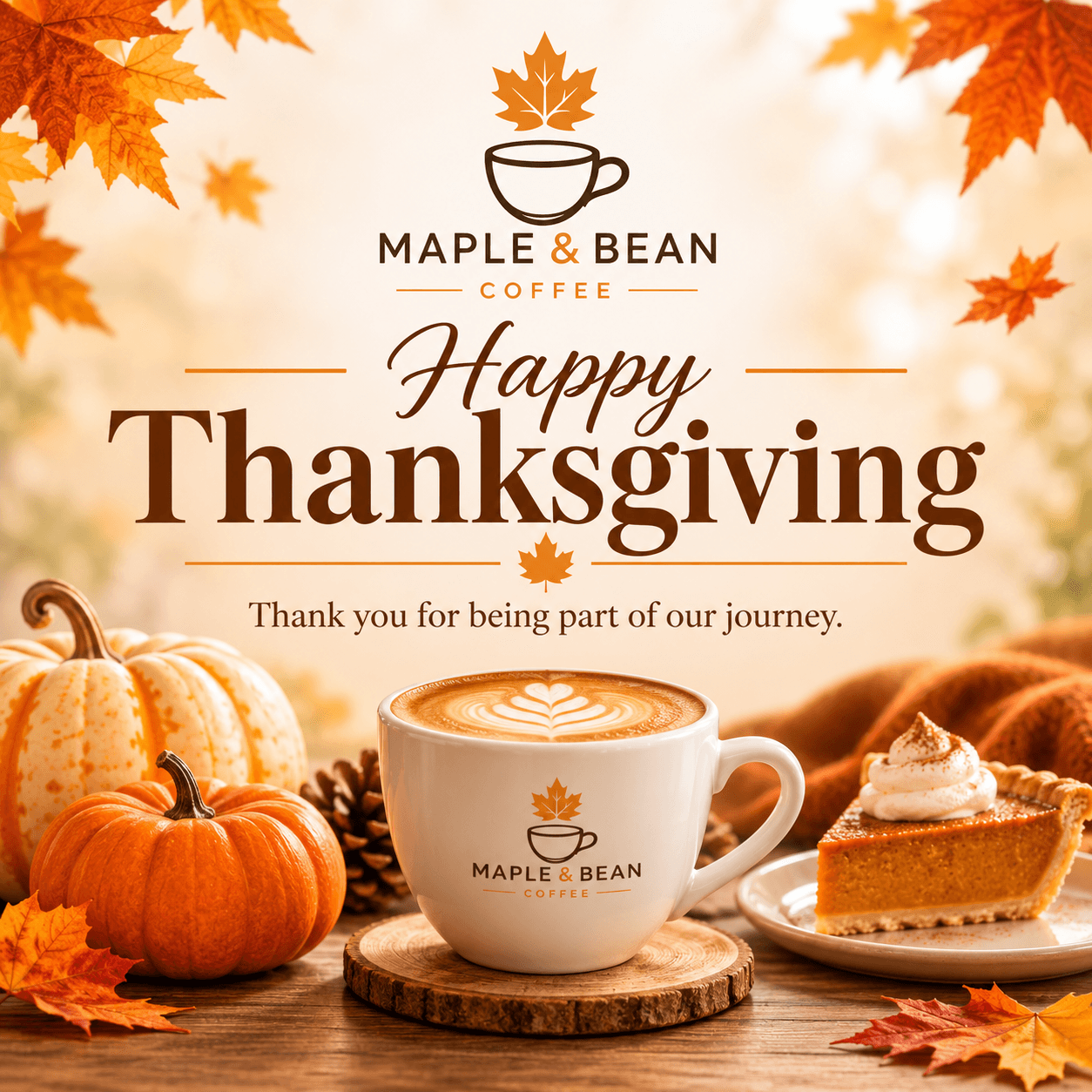 Example from the Thanksgiving Post template, generated from the logo of a fictional coffee shop (“Maple & Bean Coffee”). Not a real customer.
2. A thank-you card for clients and customers
Service businesses, agencies, and B2B brands often get more from a personal thank-you than a public post. Design one card, then share it on LinkedIn or Facebook and send it by email to your best clients. The Thanksgiving Card Generator takes your logo and generates a thank-you card design in its style; add a personal note before you send it.
3. A customer spotlight
Feature a regular, a long-time client, or a recent review, and say what they mean to your business. Always ask permission before sharing a customer’s name, photo, or words, and tag them only if they agree.
4. Your year in real numbers
Orders packed, coffees poured, projects delivered, trees planted: a short “thanks to you, this year we…” carousel turns gratitude into something concrete. Only use figures you can stand behind, and round honestly.
5. A shout-out to local partners and neighbors
Thank the suppliers, neighboring shops, and community groups you work with, and tag them. It’s generous, it’s shareable, and it sets up your Small Business Saturday posts later in the week.
6. A give-back update
If your business supports a food bank, shelter, or local cause, share what you’re doing and how customers can help. Only post a donation or impact figure you can document, and skip this idea if there’s nothing real to report.
Team and Behind-the-Scenes Post Ideas
People connect with people. These posts show the humans behind your brand during the busiest week of the season.
7. A “what we’re thankful for” team carousel
Ask each team member for one sentence and one photo, with their permission. A carousel with a slide per person works on Instagram, Facebook, and LinkedIn.
8. Prep day in 30 seconds
Film the pie preorders being boxed, the store being decorated, or the team packing holiday orders. Short vertical clips work for Reels, Stories, and other short-video feeds with very little editing.
9. A founder or owner note
A short video or text post from the owner, explaining what this year meant for the business, feels personal in a way a designed graphic can’t. Keep it under a minute or a few short paragraphs.
10. Why we’re closed on Thursday
If you close for Thanksgiving, say why: so the team can spend the day with family. It turns a schedule change into a brand moment and answers the question before people ask.
Practical Thanksgiving Post Ideas: Hours, Deadlines, and Updates
These aren’t glamorous, but they prevent missed orders and frustrated customers. Put the key information in the image and in the first line of the caption.
11. A holiday hours graphic
List every changed day in one clear image, post it early in Thanksgiving week, and repeat it in Stories. Update your hours on your Google Business Profile and Facebook Page too, since that’s where many people check first.
12. Order and preorder deadlines
If you take preorders or ship gifts, post the last day to order with a clear date and time, then post a reminder the day before. A countdown sticker in Instagram Stories works well here.
13. Shipping and pickup cutoffs
Ecommerce brands should spell out shipping cutoffs for the holiday weekend. Local businesses can share pickup windows and where to park. Practical answers save you a pile of direct messages.
Product, Offer, and Giveaway Post Ideas
Thanksgiving week is also the start of holiday shopping. Feature products in a way that feels seasonal rather than pushy, and keep every offer honest.
14. A fall product feature
Style one bestseller with seasonal props such as a table setting, warm light, or a few leaves, and explain who it’s perfect for this week, like the host, the guest, or the person who forgot dessert.
15. A gift guide carousel
Group products by person or budget (for the host, under a set price, for the coffee lover) and post it before Thanksgiving, when many shoppers start their holiday lists.
16. Bundles and preorder sets
Bundle items people already buy together, such as a pie with whipped cream, a gift box, or a service package, and show exactly what’s included. Clear contents and clear prices build trust.
17. A giveaway with honest, clear rules
Giveaways can lift engagement, but only if they’re run fairly. State who can enter, the deadline, how and when the winner is chosen and contacted, and what the prize is. Instagram’s promotion guidelines ask you to acknowledge that the promotion isn’t sponsored or administered by Instagram. Facebook doesn’t allow “share to your timeline to enter” as an entry method. In the US, sweepstakes generally can’t require a purchase to enter, so check the rules before launch. Then actually pick and announce a winner.
The Thanksgiving to Cyber Monday Post Sequence
The five days from Thanksgiving to Cyber Monday work best as a planned sequence, with one clear message per day. Thank first, sell second.
18. Black Friday: launch the offer clearly
On Friday morning, post the offer with the discount, the dates, the terms, and where to buy. Use a bold graphic for the feed and a wider version for your website or ads. uBrand has three templates for this: the Black Friday Sale Poster Generator and the Black Friday Banner Generator start from your logo, and the Black Friday Social Media Post Generator starts from a product photo. Each generates a design in that template’s style. Add your real offer details yourself, and double-check that anything in the image matches what you’re actually offering.
 Example from the Black Friday Social Media Post template, generated from a photo of an unbranded sample speaker. The example contains no prices or discounts; add your real offer details yourself.
19. Small Business Saturday: invite your community in
Saturday is about local pride. Show your space, introduce the team, thank neighbors for shopping small, and shout out other local businesses you love. The Small Business Saturday Post Generator turns your logo into a “shop small” style post you can adapt with your own message.
 Example from the Small Business Saturday Post template, generated from the logo of a fictional bookstore (“Paper Lantern Books”). Small Business Saturday is a registered trademark of American Express; this guide and the example aren’t affiliated with or endorsed by American Express.
20. Cyber Monday: the last call, by email and social
Monday is for online shoppers and your email list. Post a last-call reminder with the end time, and send a short email with one clear button. The Cyber Monday Email Banner Generator creates an email header design from your logo that you can place at the top of that message.
21. A weekend wrap-up thank-you
After the rush, close the loop: thank everyone who shopped, visited, or shared, and tell them what’s next, whether that’s restocks, holiday hours, or December events. It ends the sequence on the same note it started with.
Thanksgiving Instagram Story and Reel Ideas
Stories disappear after 24 hours unless you save them to a Highlight, which makes them perfect for quick, informal holiday updates. For more ongoing ideas, see our list of Instagram Story ideas for small businesses.
22. A gratitude question box
Use the Questions sticker to ask “What are you thankful for this year?” and share a few answers (with permission). It’s easy engagement that fits the holiday.
23. Polls and “this or that”
Pumpkin or pecan? Early bird or doorbuster? Quick polls are fun, and they tell you something real about what your followers want.
24. A Black Friday countdown
From Wednesday on, add a countdown sticker to your Stories so followers can tap to get a reminder when your offer goes live. It builds anticipation without filling your feed with sales posts.
25. A full-screen Thanksgiving Story greeting
Design a vertical greeting for Thanksgiving Day and save it to a Holiday Highlight. The Thanksgiving Instagram Story Generator generates a 9:16 greeting design from your logo in its autumn style. Leave room for a link or a countdown sticker if you need one.
Platform Tips for Thanksgiving Social Media Posts
- Instagram: Lead with the hook, because only the first line or two of a caption show in the feed. Vertical images take up more of the screen than squares. Pair every feed post with a Story so followers who mostly watch Stories don’t miss it.
- Facebook: Longer, story-style thank-you posts and community updates do well here. Use Facebook Events for in-store events, and keep your Page hours current for the holiday.
- LinkedIn: Thank clients, partners, and your team, and tag people only with their permission. Skip the sales push on Thanksgiving Day; a sincere year-in-review post fits the platform better.
- TikTok and Reels: Short, real behind-the-scenes clips such as prep, packing, and decorating usually feel more natural than polished ads. Add on-screen text so the video works with the sound off.
- Pinterest: If you sell recipes, decor, or gifts, pin your gift guide and seasonal product images early in November so they’re ready before the holiday.
Whatever the platform, keep your colors, fonts, and logo consistent so your Thanksgiving, Black Friday, and Cyber Monday posts look like one campaign from one brand.
Thanksgiving Week Posting Plan (Nov 23–30, 2026)
Use this as a starting point and adjust it to your hours and offers. If you start earlier in November, open preorders and tease your weekend offer between Nov 12 and Nov 22. The Thanksgiving captions guide includes a timeline from Nov 12.
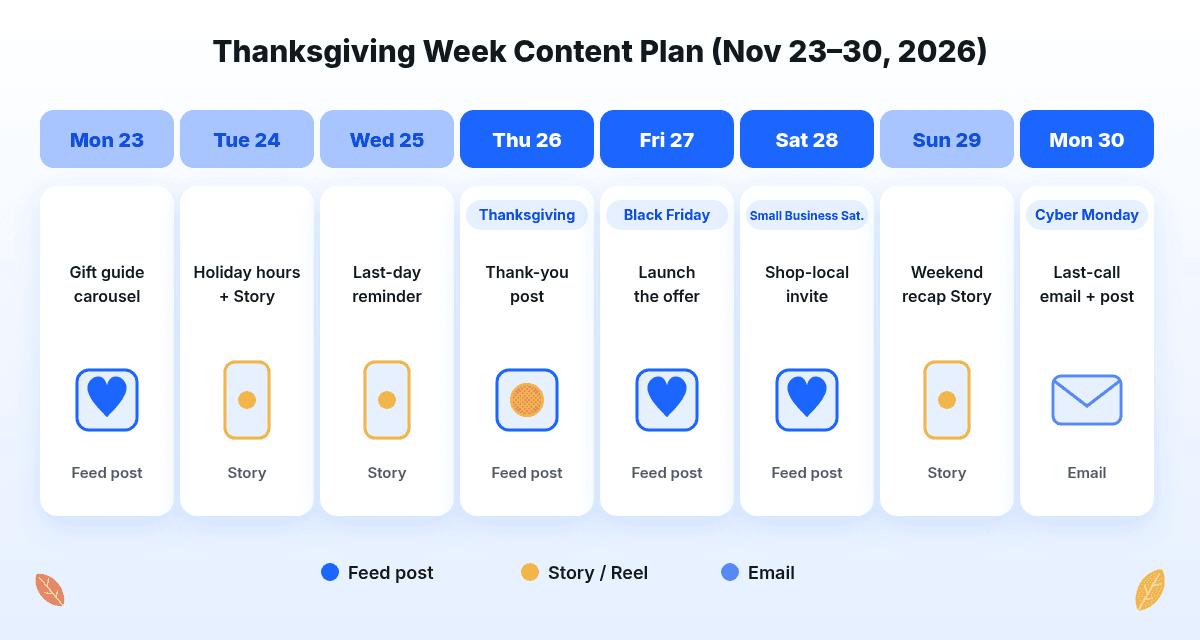 Mon, Nov 23: Gift guide carousel or fall product feature.
- Tue, Nov 24: Holiday hours graphic in the feed, repeated in Stories.
- Wed, Nov 25: Last-day-to-order reminder and a behind-the-scenes prep clip.
- Thu, Nov 26 (Thanksgiving): Your Happy Thanksgiving post and Story greeting. No hard sell.
- Fri, Nov 27 (Black Friday): Launch the offer with full details, plus a website banner.
- Sat, Nov 28 (Small Business Saturday): Shop-local invite and local business shout-outs.
- Sun, Nov 29: Light weekend recap in Stories.
- Mon, Nov 30 (Cyber Monday): Last-call email and post, then a thank-you wrap-up.
Planning past the holiday weekend? Our 30-day social media content calendar with AI prompts helps you plan December.
Frequently Asked Questions
What should a business post on Thanksgiving?
A sincere Happy Thanksgiving post that thanks your customers, team, or community, ideally with your logo or a real photo. Share holiday hours earlier in the week and save sales posts for Black Friday.
What are good Thanksgiving social media post ideas for a small business?
Customer thank-yous, a team “what we’re thankful for” carousel, behind-the-scenes prep clips, holiday hours, preorder deadlines, a gift guide, and a planned Black Friday, Small Business Saturday, and Cyber Monday sequence are all reliable choices.
Should businesses post sales on Thanksgiving Day?
Most businesses do better keeping Thanksgiving Day for gratitude and launching offers on Black Friday. If you do run a Thanksgiving Day deal, post it separately from your thank-you message.
How do I make my Thanksgiving posts look on-brand?
Use your own logo, brand colors, and fonts on every graphic, pair them with real photos where you can, and keep the style consistent from Thanksgiving through Cyber Monday. For the words, borrow from our Thanksgiving captions for business and edit them to match your brand voice.