


Black Friday Social Media Posts for Business: Ideas, Templates & a 2026 Campaign Plan

Black Friday social media posts work best as a campaign, not a single sale graphic. Between Thanksgiving and Cyber Monday, small businesses need a clear tease, a launch post, Stories that answer questions, a Small Business Saturday invite, and a Cyber Monday last call—without flooding the feed with the same discount five days in a row.
This guide is a practical Black Friday social media campaign plan for startups and small businesses. You’ll get a simple framework, about 18 post and Story ideas, platform tips for Instagram, Facebook, LinkedIn, and Reels/TikTok, and a day-by-day schedule for November 20–30, 2026. For the gratitude posts that open the week, see our earlier guide to Thanksgiving social media post ideas for business.
Key 2026 US dates: Thanksgiving is Thursday, November 26; Black Friday is Friday, November 27; Small Business Saturday is Saturday, November 28; Cyber Monday is Monday, November 30.
What Makes Black Friday Social Media Campaigns Work
Search interest in Black Friday social media posts rises sharply in November. The brands that convert that attention usually do three things well:
- One offer, many formats. The same honest deal appears as a feed post, a Story, a website banner, and an email header—not five unrelated discounts.
- Brand consistency. Logo, colors, and fonts stay the same from the first tease through Cyber Monday so the campaign feels intentional.
- A handoff across the weekend. Thanksgiving thank-you → Black Friday launch → Small Business Saturday invite → Cyber Monday last call.
Before you design anything, pull your logo, brand colors, fonts, and a few real product or store photos into one folder. If you already have Brand DNA and a brand kit, use them as the source of truth so every graphic matches. uBrand’s brand guideline and brand identity kit pages are useful when you need those assets in one place.
A Simple Black Friday Campaign Framework
Use four phases. Keep each phase to one primary message so your Black Friday Instagram posts and Stories don’t compete with each other.
- Tease (about Nov 20–25): Hint at the offer, share a gift guide, publish holiday hours, and start a countdown in Stories.
- Launch (Fri Nov 27): Post the full offer—what’s included, dates, terms, and where to buy—plus a matching site banner if you need one.
- Shop local (Sat Nov 28): Invite your community in. Lead with place and people, not only the discount.
- Last call (Sun–Mon Nov 30): Recap in Stories, then close with a Cyber Monday reminder by email and social.
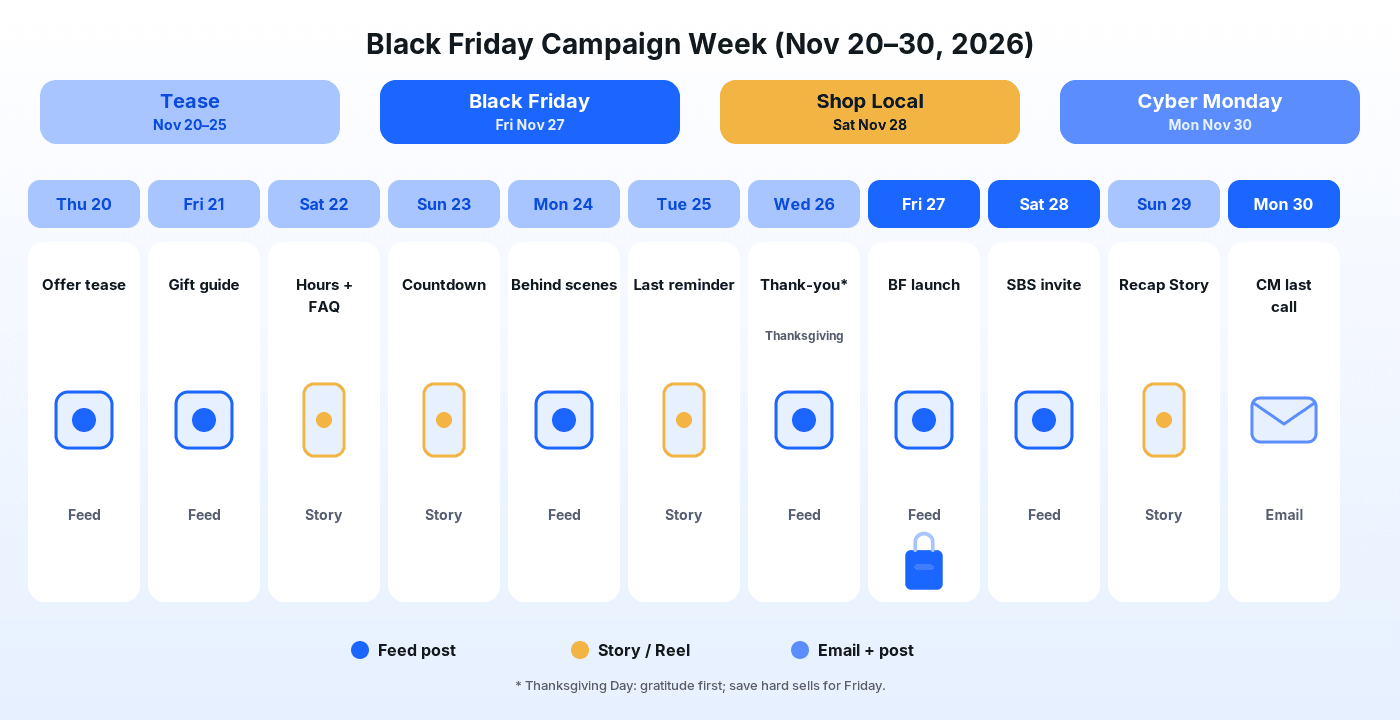
The diagram above is a starting calendar. Adjust it to your hours, shipping cutoffs, and whether you sell in-store, online, or both.
Black Friday Social Media Post Ideas for Business
Each idea below is written for a real business feed. Pair the graphic with a short caption that states the offer or the next step in the first line.
1. The clear Black Friday launch post
Friday morning needs one unambiguous graphic: the offer, the dates, the terms, and a call to action. Put the essentials in the image and repeat them in the caption. This is the anchor of your Black Friday social media posts for the whole weekend.
If you need a starting design, the Black Friday Social Media Post Generator lets you upload a product image and generate a post in that template’s style. Check the result before you publish, edit anything that doesn’t fit, and add your real prices and terms yourself—templates won’t know your actual deal.

Example from the Black Friday Social Media Post template, generated from a photo of an unbranded sample speaker. Decorative only—add your real offer details yourself. Not a real customer campaign.
2. A square feed variant and a wide banner
Resize the same offer for Instagram/Facebook feed and for your website hero or ads. The Black Friday Sale Poster Generator and Black Friday Banner Generator both start from your logo and generate designs in each template’s style. Keep copy identical across sizes so customers aren’t confused by mismatched dates.

Example from the Black Friday Sale Poster template. Generated sample art may include decorative sale elements; replace them with your real offer, dates, and terms before you use it.

Example from the Black Friday Banner template—useful as a site header companion to your social launch post.
3. A “starts Friday” tease (3–5 days out)
Post a soft tease mid-week: “Our Black Friday offer goes live Friday at 9 a.m.” without dumping every detail. Curiosity posts outperform full-price dumps before the launch day.
4. A gift guide carousel
Group products by person or budget (for the host, under a set price, for remote teams). Publish it before Thanksgiving so shoppers can shortlist early. The Holiday Gift Guide Generator can help you draft a branded gift-guide layout from your logo; swap in your real products and prices.
5. Holiday hours and FAQ Story set
Answer the questions you’ll get anyway: Are you open Thanksgiving? When does the deal end? Do you ship in time? Put hours in a feed graphic once, then repeat them as Story slides with a link sticker where available.
6. A countdown sticker series
From about Nov 23 onward, add an Instagram countdown sticker pointing at your launch time. Pair it with a vertical frame that matches your campaign colors so Stories feel on-brand.
7. Behind-the-scenes prep Reel
Film packing stations, window displays, or inventory arriving. Short vertical clips build trust and give you content that isn’t another static sale tile. Add on-screen text so it works with sound off.
8. Founder or owner “why this offer” note
A 30–45 second talking-head Reel or a short LinkedIn post explaining who the deal is for (and what it isn’t) feels more human than another bold percentage graphic.
9. Customer proof carousel
Collect real reviews or UGC with permission. One quote per slide, with the product they bought. Proof posts convert better during sale weekends than feature lists alone.
10. Bundle and “what’s included” graphic
If you sell sets, show every item in the bundle with a clear total. Ambiguous “mega deal” language creates refund requests; specific contents build trust.
11. Shipping and pickup cutoff post
Ecommerce brands should state the last order time for delivery before the holidays. Local shops can list pickup windows and parking notes. Practical posts reduce DM volume.
12. Instagram Story poll: “this or that”
Let followers vote between two products or two gift directions. Use the winning option in Friday’s Story highlights and in your email subject line test.
13. Small Business Saturday invite
Saturday is about community. Show your space, introduce the team, thank neighbors, and shout out other local businesses. The Small Business Saturday Post Generator turns your logo into a shop-local style post you can adapt with your own message.

Example from the Small Business Saturday Post template, generated from the logo of a fictional bookstore (“Paper Lantern Books”). Small Business Saturday is a registered trademark of American Express; this guide and the example are not affiliated with or endorsed by American Express.
14. Local partner tag carousel
Feature three neighboring businesses you love (with permission). It earns goodwill, gets shares, and reinforces the shop-local theme without another hard sell.
15. In-store only or online-only clarification
If your Black Friday deal differs by channel, say so in one clean graphic. Mixed messages across Instagram and your website are a common weekend support headache.
16. Midday “still on” reminder Story
On Friday afternoon, post a Story that restates end time and link. Many shoppers miss the morning launch while traveling or hosting.
17. Sunday soft recap
Share a few candid photos from the weekend rush, thank early shoppers, and hint that Cyber Monday still has the online offer if that’s true for you.
18. Cyber Monday last-call email + matching post
Monday is for inbox and feed. Send a short email with one button, and post the same end time socially. The Cyber Monday Email Banner Generator creates an email header design from your logo that you can place at the top of that message—again, insert your real offer copy yourself.
Black Friday Instagram Post and Stories Tips
Instagram still carries most of the visual load for Black Friday social media campaigns for consumer brands:
- Feed: Prefer 4:5 vertical when you can; lead the caption with the offer or the next step because only the first lines show.
- Stories: Use them for hours, FAQs, countdowns, and midday reminders. Save the best frames to a Holiday or Sale Highlight.
- Reels: Keep prep and unboxing clips under 30 seconds with large on-screen text.
- Consistency: Reuse the same color blocks and logo placement so your Black Friday Instagram posts look like one campaign, not unrelated templates.
You can also explore general layouts in the uBrand social post generator when you need non-holiday styles for follow-up content after the weekend.
Platform Tips Beyond Instagram
- Facebook: Longer captions and event posts work well for local businesses. Keep Page hours updated for the holiday week. Boost only the launch post if you run ads, not every Story screenshot.
- LinkedIn: Better for B2B and service brands: thank clients, share a year-end offer for teams, and avoid doorbuster language on Thanksgiving Day.
- TikTok and short video: Same behind-the-scenes clips as Reels. Hook in the first two seconds; put the offer end time on screen.
- Email / SMS: Treat Cyber Monday as an owned-channel close. Match the creative to your social last-call post so the brand feels coherent.
Day-by-Day Posting Plan (Nov 20–30, 2026)
Use this as a default calendar for Black Friday social media campaigns. Shift times to match when your audience is actually online.
- Thu, Nov 20: Soft offer tease in the feed.
- Fri, Nov 21: Gift guide carousel.
- Sat, Nov 22: Holiday hours + FAQ Stories.
- Sun, Nov 23: Countdown sticker Story.
- Mon, Nov 24: Behind-the-scenes prep Reel or photo set.
- Tue, Nov 25: Last-day reminder before Thanksgiving travel.
- Wed, Nov 26 (Thanksgiving): Thank-you post only—no hard sell. Caption ideas live in our Thanksgiving captions for business guide.
- Fri, Nov 27 (Black Friday): Launch post + site banner + morning Story; midday “still on” Story.
- Sat, Nov 28 (Small Business Saturday): Shop-local invite and partner shout-outs.
- Sun, Nov 29: Light weekend recap in Stories.
- Mon, Nov 30 (Cyber Monday): Last-call email banner + matching social post, then a short thank-you wrap-up.
Keep the Campaign On-Brand
Sale weekends are when mismatched fonts and random stock templates dilute trust. Stick to your logo, palette, and voice from the first tease through Cyber Monday. uBrand is an AI brand identity platform for startups and small businesses—covering logo through Brand DNA, guidelines, and content assets—so if you’re already building that system, reuse it for holiday creative instead of starting from a blank canvas each time.
When you generate holiday designs from a template, upload your logo or product image, generate in that template’s style, review the result carefully, and edit anything that doesn’t fit. Always overlay your real prices, dates, and legal terms yourself.
Frequently Asked Questions
What should a business post for Black Friday on social media?
Lead with one clear launch post that states the offer, dates, terms, and where to buy. Support it with Stories for hours and reminders, a Small Business Saturday community invite, and a Cyber Monday last call. Keep Thanksgiving Day for gratitude.
When should I start Black Friday social media posts in 2026?
Two to four weeks before Black Friday is a solid window. For 2026, starting teasers around November 20 leaves about a week before Friday, November 27, which is enough for most small businesses without wearing out your audience.
How is a Black Friday Instagram post different from a Story?
The feed post is the durable announcement people can revisit. Stories are for countdowns, FAQs, social proof, and same-day reminders that disappear after 24 hours unless you save them to a Highlight.
Can I reuse the same creative for Small Business Saturday and Cyber Monday?
Reuse the visual system (colors, logo, fonts), but change the message. Saturday should feel local and communal; Monday should feel like a clear online last call with an end time.