


Christmas Banner Ideas for Websites, Email & Ads (2026)

A Christmas banner is the wide graphic at the top of a website, a holiday email, or an ad. People often see it for only a second or two. In that time it has to look like your business and say one useful thing, such as hours, a shipping date, a gift idea, or a greeting.
Here are practical Christmas banner ideas for small shops, studios, and service businesses in 2026. You will find common sizes, 25 ideas grouped by where the banner runs, notes on writing a short headline, and a calendar for when to put a banner up and when to replace it. Use what fits and skip the rest. Fill in your own hours, prices, and cutoff dates, and do not publish a number you have not checked.
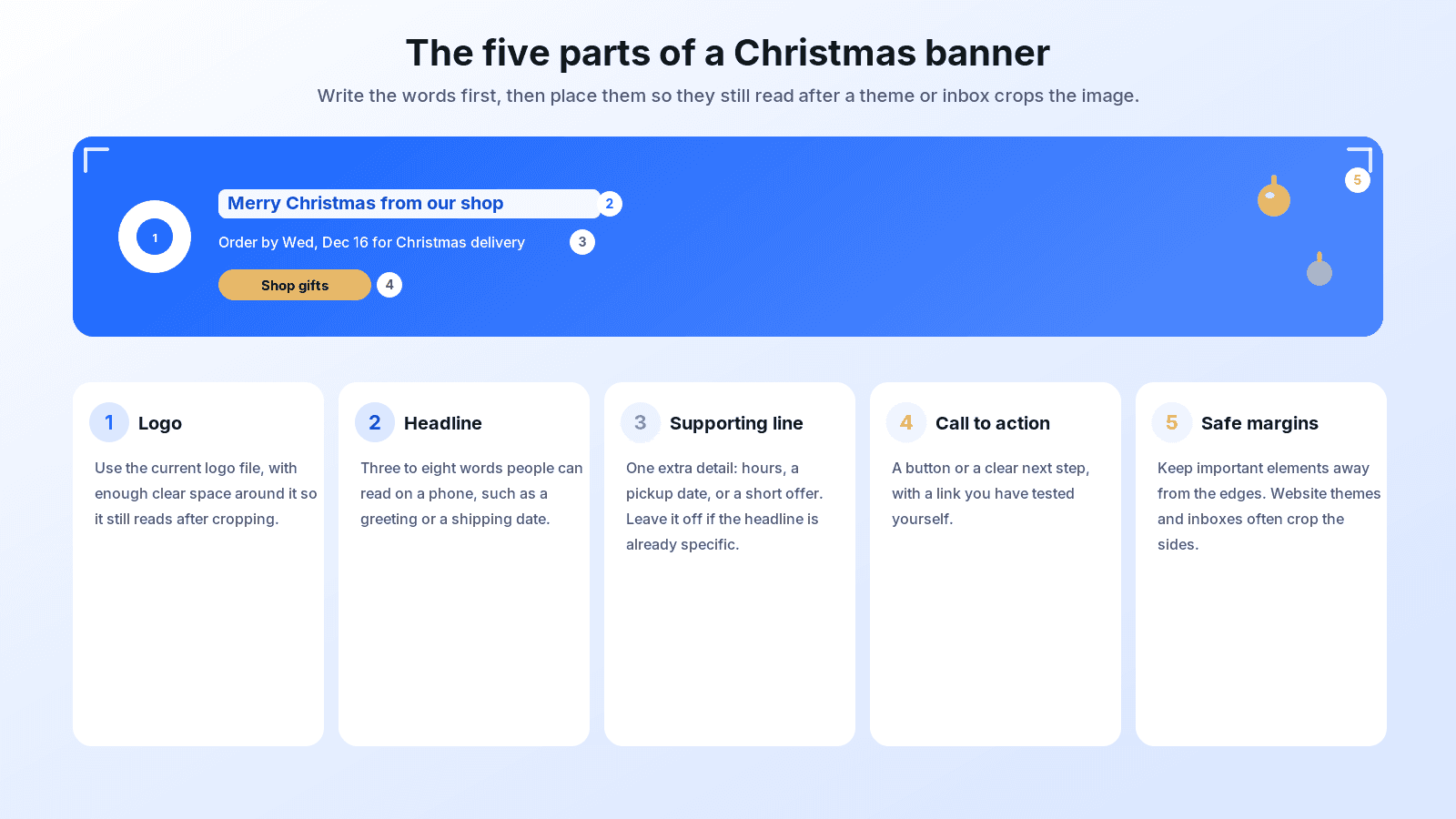
What a Christmas Banner Needs to Include
Every banner on this list can be built from the same pieces: your current logo, one short headline, and a little room for a date, an offer, or a button. If those three things are clear on a phone, people can use the banner.
Keep the logo, colors, and type consistent with the rest of your site and emails. A customer who opens a December newsletter and then lands on your homepage should recognize the same business. A brand guideline is the place to keep those logo, color, and font rules in one document. A brand kit gathers the same building blocks for everyday use.
Decide the greeting early. Some audiences expect "Merry Christmas." Others are better served by "Happy holidays" or "Season's greetings." Use one primary greeting on public banners, and stay consistent through December. You can still use Christmas wording on a dedicated Christmas campaign if that matches what you sell.
Common Christmas Banner Sizes
There is no single correct size, because every website theme, email client, and ad network crops a little differently. These are sizes that small businesses use often. Treat them as a starting point, then check the live page or preview on a phone before you leave a banner up.
- Website hero or homepage banner: a wide crop, often around 1920×600 to 1920×800 pixels, or a 16:9 frame that the theme crops. Keep the logo, headline, and button away from the far edges, because mobile layouts usually crop the sides or the top and bottom.
- Email header: 600 pixels wide is the usual canvas. 600×200 and 600×300 are common. Some inboxes clip taller images, so put the words in the upper two-thirds and avoid tiny type.
- Landscape social or ad creative: 1200×628 or 1080×566 works for many feed placements. If you also run a square version, make a separate file rather than letting the network crop a wide banner through the middle of the logo.
- Display ads: 728×90, 300×250, and 970×250 are still widely used. These are tight, so one line of type and the logo are usually enough.
- In-store screen or window display: follow the screen's native ratio. A website hero file is a reasonable starting point if the screen is wide; a poster or flyer layout is better if the screen is tall.
If you only make two files this season, make a wide website banner and a 600-pixel-wide email header. You can reuse the same headline on both, then adapt the crop.
 25 Christmas Banner Ideas
The ideas below are written so you can drop in real details. A banner that says "Order by Wednesday, December 16, for Christmas delivery" is more useful than one that only says "Shop gifts." If a generated graphic adds a headline, a date, or a discount, replace the placeholders with your information and read every word before you put it on your site or in an email yourself.
Website and online store
1. A greeting with no offer
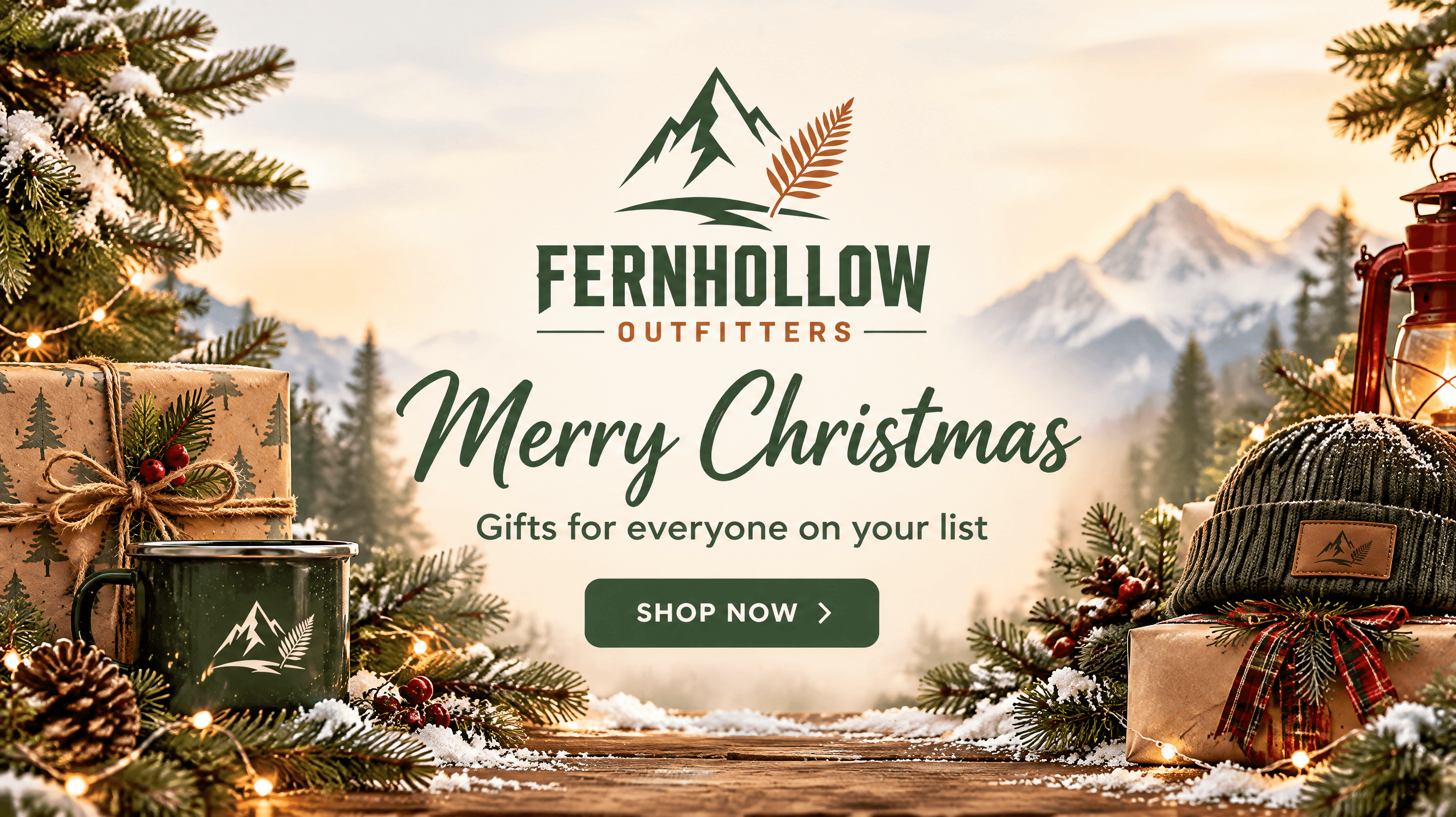
For the first days of December, a clean "Merry Christmas from [business name]" or "Happy holidays from our shop" is enough. This is the easiest Christmas website banner to live with, because you will not have to rush back and change a price or a code.
You can turn your logo into a Christmas website banner and then swap in your own greeting. The example below was generated on that template page for a fictional brand, not a real customer.
 2. A gift guide headline
Send people to a short list of products you actually have. "Gifts for cooks, neighbors, and late shoppers" is clearer than "Holiday gifts." If you want a matching product graphic for the page the banner points to, you can upload a product photo and turn it into a holiday gift guide graphic.
3. The last-order or shipping cutoff
This is often the most useful mid-December banner on a site that ships. Write the weekday and the date, for example "Order by Wednesday, December 16, for Christmas delivery." If you also offer local pickup, say so in the second line. Repeat the date in the body of the page, and take the banner down once the cutoff has passed, or change it to whatever you can still do.
4. Holiday hours on the homepage
If you will be closed on Friday, December 25, and open on Saturday, December 26, put that on the banner. An hours page alone is easy to miss. Use the weekday, the date, and the time, for example "Closed Friday, December 25. Open Saturday, December 26, 10 a.m. to 4 p.m." For more wording, see our guide to a holiday hours sign. You can also create an on-brand holiday hours sign from your logo; the layout leaves blank lines so you can fill in your real hours before you display or post it.
5. Gift cards or gift certificates
"Give a [business] gift card" works when people want to buy something and cannot choose a product. Say how to buy it (in the shop, at the register, or through a link) and whether it can be used after January 1.
6. Online order, local pickup
A good option for bakeries, florists, and small retailers: "Order online, pick up on [street or neighborhood]." Add the last pickup date if you have one. This banner is for businesses that can actually fulfill it that way.
7. A workshop, class, or event
Studios, cafes, and shops that host a December event can use the banner as a one-line poster: "Wreath workshop, Saturday, December 12, 2 p.m." Include how to book, and take it down the day after the event. You can create an on-brand Christmas flyer from your logo and use the same details; add the real time and place before you display it.
8. A seasonal menu or appointment window
Restaurants, salons, and clinics do not need a retail sale banner. "Christmas Eve seating at 5 and 7:30" or "Last coloring appointments before December 24" tells people how to plan. Bookings and menu prices belong in the details, not as decoration on the graphic.
Email headers
9. A greeting at the top of the December newsletter
A 600-pixel-wide header with your logo and a short greeting sets the tone for a gift guide, a story about the year, or a simple hours update. You can create a Christmas email banner from your logo. The sample below was generated on that template page for a fictional brand, not a real customer.
 10. One offer, one header
If you are sending a sale email, put the offer in the header in plain language: "20% off in-store and online, through Sunday, December 13." Do not promise a number you cannot honor in checkout. Keep the same wording in the subject line and the first paragraph so the email does not contradict itself.
11. A shipping-cutoff reminder in the header
In the second and third weeks of December, the header can carry the date again. People skim. If the date is only in the third paragraph, some of them will miss it.
12. A thank-you email header
After the rush, or on December 26, a header that says "Thank you for a year with us" is enough. Name one real detail in the body of the email, such as a product people kept buying or a year in the neighborhood.
13. Hours or delayed replies
If your inbox will be quieter from December 24 to December 26, say so in the header of any email you still send, and in your auto-reply. "We will answer messages on Saturday, December 26" is more helpful than "We are out of the office."
14. A leftover-gifts or "we are open" header
On December 26, if you are open, a short "Open today, 10 to 4" or "A few gifts still in stock" header is useful. Boxing Day language only belongs here if you actually run that promotion.
Ads, social, and printed pieces
15. The same offer, cropped for a landscape ad
Reuse the website headline on a 1200×628 or similar ad, then check that the logo and button still sit inside the safe area. Change the file if the network crops through the type.
16. A square version of the same banner
Feeds often show a square. Rebuild the layout instead of trimming a wide banner down the middle. The logo can sit above the headline, with the date under it.
17. A local event or late-night shopping hours
"Open late Thursday, December 17, until 8 p.m." is a banner and a post. Put the address or neighborhood in the second line if you are buying local ads. For caption ideas to run next to the creative, see Christmas Instagram captions for business and Christmas social media posts.
18. Book before we close
Service businesses can run a simple booking banner: "Book your December appointment by Friday, December 18." Link it to your real booking page, and take it down once those slots are gone.
19. A "shop small" or neighborhood banner
If you are a local shop, a banner that names the street or the town, and invites people in before Christmas, is often stronger than a generic sale. Only use a "shop small" line if you are independently owned and the claim is true.
20. A short Christmas post that matches the banner
The homepage banner and the feed should feel like the same season, even if the crop is different. You can create a Merry Christmas social post from your logo and keep the same greeting you used on the site.
After Christmas and into the New Year
21. "Open on Saturday, December 26"
Christmas Day is a Friday in 2026, so Saturday traffic matters if you are open. A short banner with hours is enough. If you are closed that weekend, say when you reopen.
22. A year-end thank-you on the homepage
From December 26 to December 30, you can replace the sale or cutoff banner with a thank-you. Mention a real detail in a line of supporting text, then leave the rest of the homepage alone.
23. Swap to a New Year banner
A Christmas banner still sitting on the site on January 2 looks leftover. Plan the swap. You can turn your logo into a Happy New Year banner for the website, and use it in email as well if the crop still holds at 600 pixels wide. "Happy New Year from [business name]" is enough; you do not need fireworks in the artwork.
24. Regular hours returning
"Regular hours resume Monday, January 4" (or whatever date is true for you) helps people who still have your holiday schedule in mind. Use the same wording on the door and on Google if you updated those listings in December.
25. A New Year offer only if you have one
If you have leftover inventory or a genuine January offer, put the end date on the banner. If you do not have a sale, do not invent one just to fill the slot. A greeting and your regular hours are a complete homepage.
Write the Words Before You Design the Graphic
Most weak Christmas banners fail because of the copy. Draft the headline in a notes app, read it out loud, and only then place it on the banner.
- Keep the headline short enough to read on a phone, usually about three to eight words, then add a date or a button in a second line if you need it.
- Put the weekday and the date on the banner itself. People often miss a date that only appears further down the page.
- If you mention a percentage off, a gift-with-purchase, or free shipping, the checkout or the counter has to honor that exact promise.
- Avoid filling the banner with a paragraph in all caps. Holiday ornaments and snow also count as clutter if they sit on top of the words.
- Check the banner on a light background and a dark one if your site theme changes, and look at it at the width of a phone.
When the graphic is ready, click the button or the banner yourself and confirm that the link goes to the right page. Then look at the hours, the price, and the cutoff date one more time before you publish the page or send the email.
When to Put Christmas Banners Up in 2026
In the United States, Christmas Day is Friday, December 25, and New Year's Day is Friday, January 1, 2027. If you are reading this in late November, you still have time to finish a first website banner and an email header before December begins. Thanksgiving week (Thursday, November 26, through Monday, November 30) is already crowded with shopping messages, so a full Christmas website banner often lands more comfortably in the first week of December, once those days have passed.
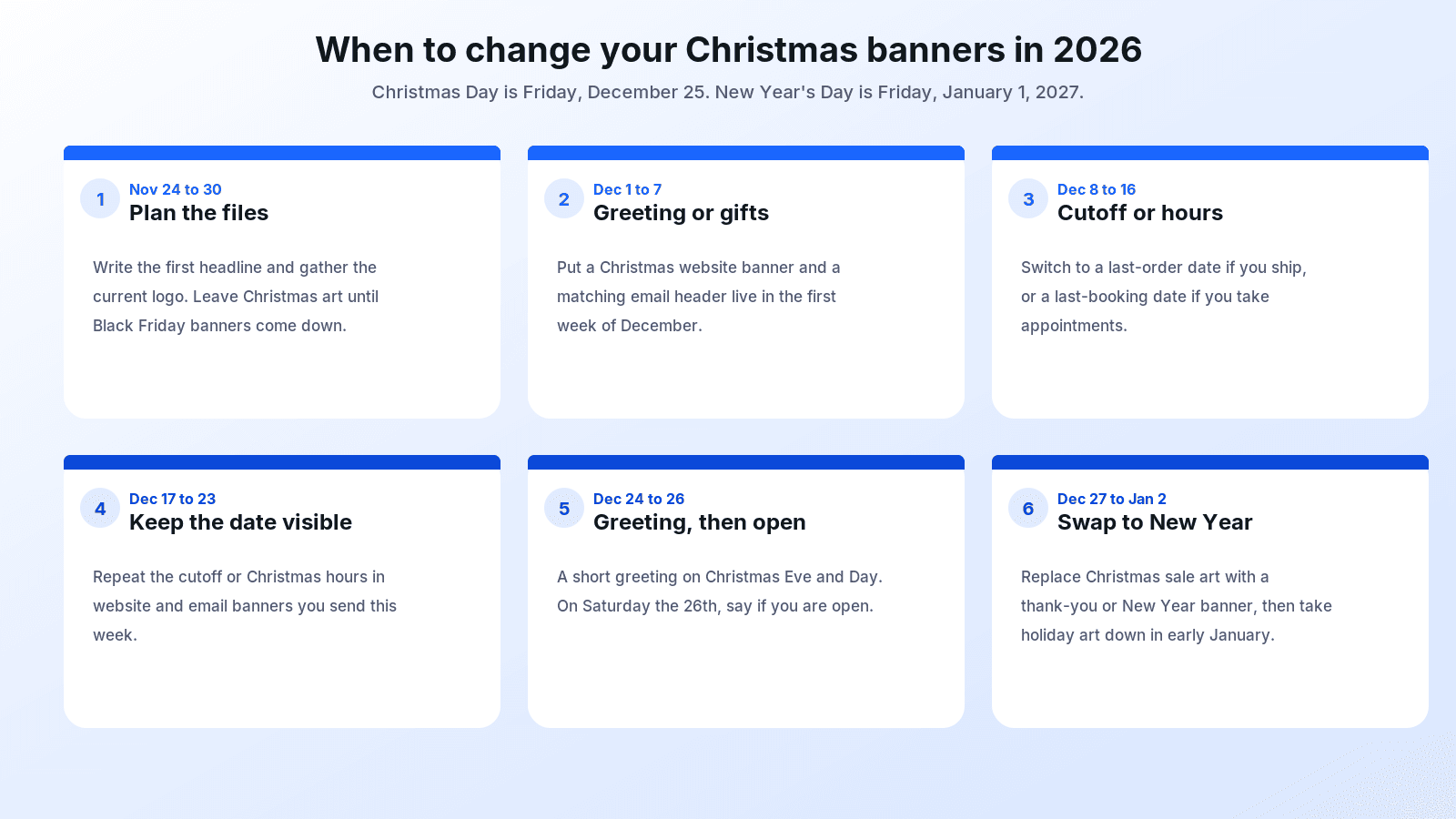 Now through Monday, November 30: Pick your sizes, write the first headline, and gather the current logo file. If you are running Black Friday or Cyber Monday banners this week, leave the Christmas website banner until those come down.
- Tuesday, December 1, to Monday, December 7: Put up a greeting or gift-guide banner on the website, and start using the matching email header.
- Tuesday, December 8, to Wednesday, December 16: Switch the homepage to a last-order or shipping-cutoff banner if you fulfill orders. Service businesses can use this window for a last-booking date instead.
- Thursday, December 17, to Wednesday, December 23: Keep the cutoff visible, or change to Christmas hours if that is now the thing people need. Repeat the date in email headers you send this week.
- Thursday, December 24, to Saturday, December 26: A short greeting is enough on Christmas Eve and Christmas Day. On Saturday, December 26, use an "open today" or thank-you banner if you are open.
- Sunday, December 27, to Friday, January 1: Replace remaining Christmas sale art with a thank-you or a Happy New Year banner. Include hours for December 31 and January 1 if they change.
- Saturday, January 2, onward: Take Christmas banners down. A New Year greeting can stay for a few days, then return to your regular homepage banner and regular hours.
For a wider week-by-week plan that also covers posts, cards, and hours signs, see holiday marketing ideas for small business. For card wording you can send alongside a December email, see business Christmas card messages.
A Short Checklist Before You Publish
Run through this once per banner, including each time you change the headline.
- The logo file is the current one, with enough clear space around it.
- The colors and type match your brand guideline, not a generic red-and-green palette unless those are already your colors.
- The headline, date, hours, price, and code are real, and they match the page or email they point to.
- The link works on a phone, and the important words still show after the theme or the inbox crops the image.
- You already know the date you will swap or remove this banner, especially after December 25.
A Christmas banner is worth making even when it does not announce a sale. One clear line, your logo, and a date people can trust will serve the website and the inbox better than a crowded holiday scene with no information on it.