


Fake Instagram Profile Maker & Generator for Brands
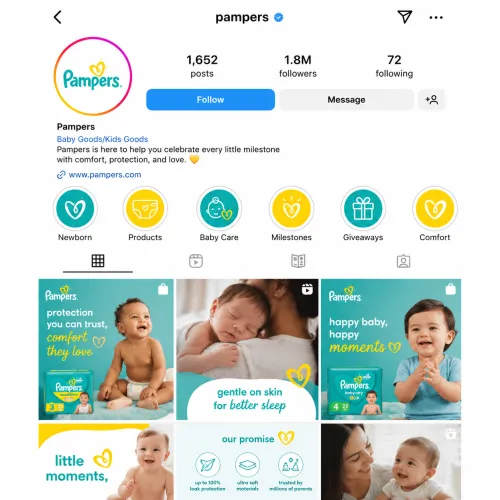
Upload your logo to create a realistic Instagram profile screen: username, bio, follower counts, posts grid and highlights. An image only, not a real account.

How to Make a Fake Instagram Profile for Your Brand
- Upload your logo — Click + above and upload your brand logo.
- Describe your profile (optional) — Use the text box to add details, such as your brand name, what you post about or the look you want.
- Click Generate — AI creates an Instagram-style profile screen around your logo and brand colors.
- Review before you share — Check the username, bio and numbers in the image, then use it in your concept, plan or presentation.
What the Instagram Profile Generator Creates
- A profile picture based on your logo
- A username and a short bio
- Follower, following and post counts
- A posts grid styled to match your brand
- Story highlights
- A clean, modern Instagram-style layout that follows your brand identity and colors
Ways to Use a Fake Instagram Profile Maker
- Test a new brand name and handle — See how your name, username and bio read before you claim the account.
- Plan your profile look — Preview how your highlights and posts grid could work together.
- Design and app mockups — Drop a realistic profile screen into a website, app or UI concept.
- Pitch a social media concept — Show stakeholders what a new account could look like.
- Class projects and storyboards — Create a profile image for a school project, presentation or video scene.
Use Generated Profiles Responsibly
Profiles made with this tool are images for concepts, mockups and planning. They are not real Instagram accounts and are not connected to Instagram. Usernames, follower counts and other details are AI-generated placeholders, so check them before you share the image.
Don't use generated profiles to impersonate a real person or brand, mislead people, or present fake numbers as real.
Need a Mockup for a Presentation?
Want to show your brand's profile on a smartphone for a pitch deck or portfolio? Try the Instagram mockup generator.
Fake Instagram Profile Maker FAQs
What is a fake Instagram profile maker?
A fake Instagram profile maker creates an image that looks like an Instagram profile page, without creating a real account. uBrand's version builds the profile around your brand logo.
Does it create a real Instagram account?
No. It generates an image only. No account is created and nothing is posted to Instagram.
What does the generated profile include?
A profile picture based on your logo, a username, a bio, follower and post counts, a posts grid and story highlights, in an Instagram-style layout that follows your brand colors.
Are the usernames and follower counts real?
No. They are AI-generated placeholders. Check them before you share the image, and don't present them as real numbers.
What can I use a fake Instagram profile for?
Testing a brand name, handle and bio before launch, planning your profile look, design and app mockups, social media concept pitches, and class projects.
Can I make a fake Instagram profile of someone else?
Use the tool for your own brand or with permission. Don't use generated profiles to impersonate anyone, mislead people or break Instagram's rules.
How is this different from the Instagram mockup generator?
This tool creates the profile screen itself. The Instagram mockup generator shows your brand's profile on a smartphone, ready for presentations and portfolios.
Is the fake Instagram profile maker free?
You can try one free generation after signing in. The free try is shared across uBrand's design tools, so after you've used it, each generation uses credits. Downloading your design requires credits or a membership.
More Tools for Your Brand's Social Presence
Instagram is a trademark of Meta Platforms, Inc. uBrand is not affiliated with, endorsed by or sponsored by Instagram or Meta.